Google Classroom Integration
1,500+ STEM Resources to Use with Google Classroom
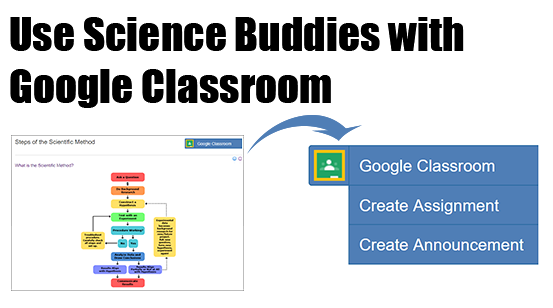
Science Buddies resources are fully integrated with Google Classroom making it easy to announce, assign, grade, and return STEM assignments with a few simple clicks. For teachers who are logged in to Science Buddies with a Google Classroom account, any Science Buddies resource that has the Google Classroom icon can be assigned with just a few steps.
- Navigate to the resource you would like to assign
- Click the Google Classroom icon
- Select Assignment or Announcement
- Enter the assignment details
Custom Tools for Google Classroom
Science Project Pathways:
One tool to plan, assign, and manage a science project in your class.
The Science Project Pathways is a powerful scheduling tool that breaks the science project into a series of smaller more manageable assignments. The assignments use Science Buddies guide to the scientific method to take students step-by-step through a science project. Teachers enter the project start date, and the tool will create a custom schedule with recommended assignments and due dates. From the schedule, teachers can make assignments in Google Classroom and view student progress on each assignment.
Teaching the Scientific Method:
A quick reference table with links to assignable resources for teaching the scientific method, including worksheets and quizzes only available to Google Classroom users.
| Reading | Quiz | Worksheet |
| Getting Started | ||
| The Scientific Method | Quiz (Beginner) Quiz (Intermediate) | |
| Your Question | Quiz | Worksheet |
| Topic Selection Wizard | Worksheet | |
| Laboratory Notebook | ||
| Doing Background Research | ||
| Background Research Plan | ||
| Finding Information | ||
| Bibliography | ||
| Research Paper | ||
| Constructing a Hypothesis | ||
| Variables | Quiz | Worksheet |
| Variables for Beginners | ||
| Hypothesis | Quiz | Worksheet |
| Testing Your Hypothesis by Doing an Experiment | ||
| Experimental Procedure | ||
| Materials List | ||
| Conducting an Experiment | ||
| Analyzing Your Data and Drawing a Conclusion | ||
| Data Analysis & Graphs | Quiz | |
| Conclusions | Quiz | |
| Communicating Your Results | ||
| Final Report | ||
| Abstract | ||
| Display Board | ||
| Science Fair Judging | ||
Teaching the Engineering Design Process:
A quick reference table with links to assignable resources for teaching the engineering design process, including worksheets and quizzes only available to Google Classroom users.
| Reading | Quiz | Worksheet |
| Getting Started | ||
| Engineering Design Process | Quiz (Beginner) Quiz (Intermediate) | |
| Define the Problem | ||
| Design Notebook | ||
| Gathering Data | ||
| Background Research | ||
| Specify Requirements | ||
| Generating Ideas | ||
| Brainstorm Multiple Solutions | ||
| Choose the Best Solution | ||
| Implementing a Solution | ||
| Development Work | ||
| Prototyping | ||
| Test and Redesign | ||
More About our Google Classroom Integration
Explore these resources for additional tips and suggestions on using Science Buddies resources with Google Classroom:
Getting Started with Google Classroom
If you are new to Google Classroom, this video walks you through how to set up a classroom so you can start making assignments.